> For the complete documentation index, see [llms.txt](https://support.whapi.cloud/help-desk/llms.txt). Markdown versions of documentation pages are available by appending `.md` to page URLs; this page is available as [Markdown](https://support.whapi.cloud/help-desk/source-code/whatsapp-chatbot/bot-template-for-n8n.md).
# Bot Template for n8n
Create a fully functional WhatsApp bot in 10 minutes with a visual n8n workflow template and Whapi.Cloud
### What is it?
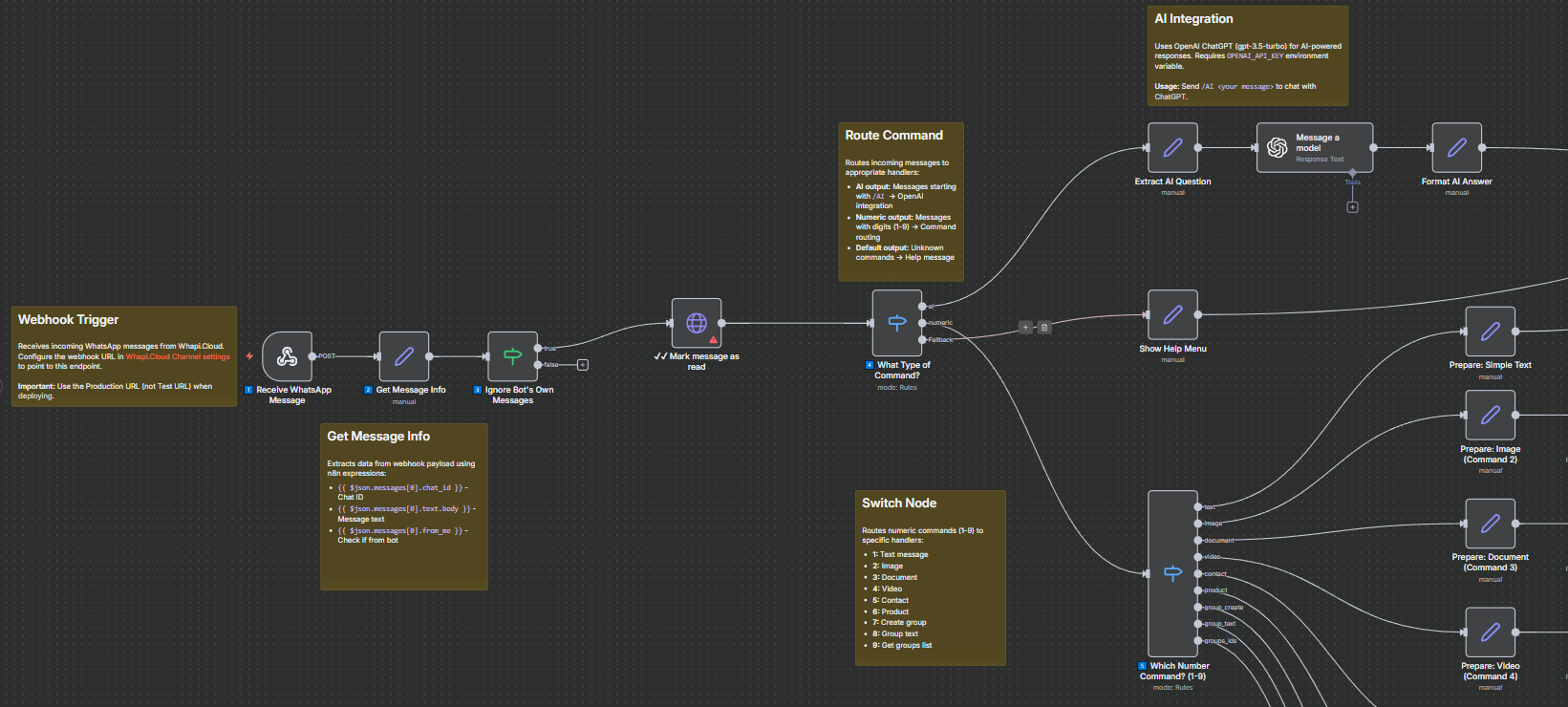
A ready-to-use WhatsApp bot template for **n8n** automation platform. Import the visual workflow into your n8n instance and start using immediately - no programming required.
Perfect for **quick testing** and **easy customization** for your business needs. Modify commands, add features, and integrate with other services directly in the visual editor.
Download the template below via the link
### Key Features
* Send text messages, images, documents, videos, contacts
* **Full group management** — create groups, send group messages, get group list
* AI integration (OpenAI ChatGPT)
* Product catalog support
### Group Management
The template includes complete WhatsApp group functionality:
* **Create groups** — Automatically create new groups and add participants
* **Send group messages** — Broadcast messages to all group members
* **Get group list** — View all your groups with IDs and names
### Quick Setup
1. Open the GitHub repository page:
2. Download `whatsapp-demo-bot-whapi-n8n.json`
3. Import to n8n (Workflows → Import from File)
4. Configure Whapi.Cloud token in credentials
5. Add webhook URL to Whapi.Cloud settings
6. Activate workflow
Detailed instructions are in workflow sticky notes.
{% hint style="success" %}
This template is already available on the official n8n website:
{% endhint %}
### Available Commands
* `/ai ` — AI chat
* `1-6` — Send messages, media, contacts, products
* `7` — Create group
* `8` — Send group message
* `9` — Get groups list
***
For advanced customization and deeper integration scenarios, you may find the following guides helpful:
* [**API via HTTP in n8n Cloud**](/help-desk/integrations/api-via-http-in-n8n-cloud.md) - a detailed walkthrough on how to interact with the Whapi.Cloud API using HTTP Request nodes in n8n Cloud, including authentication setup, request configuration, and common usage patterns.
* [**Custom Node for n8n**](/help-desk/integrations/custom-node-for-n8n.md) - a comprehensive guide for developers who want to build and maintain a custom n8n node for Whapi.Cloud, enabling tighter integration, reusable abstractions, and advanced automation logic.
These guides provide additional technical depth beyond this article and are recommended for users who plan to extend or modify the bot’s behavior.