> For the complete documentation index, see [llms.txt](https://support.whapi.cloud/help-desk/llms.txt). Markdown versions of documentation pages are available by appending `.md` to page URLs; this page is available as [Markdown](https://support.whapi.cloud/help-desk/account-and-whapi-channels/billing.md).
# Billing
Paying for the WhatsApp API and Managing your Subscriptions
Subscription Management Dashboard
### **Billing and Subscription**
Whapi Cloud supports two payment methods:
* **Card payments** (credit or debit card)
* **Cryptocurrency** (currently available for one-time purchases only)
**A subscription exists only on a paid channel.** When you pay for a single channel, a recurring subscription is created that automatically renews each billing period.\
Payments for multiple channels or payments via cryptocurrency are processed as one-time transactions without automatic renewal.\
**Trial and free Sandbox channels have no subscription and no stored card. Nothing is charged when the trial ends, and there is nothing to cancel. A card is required only when you upgrade to a paid plan.**
Annual billing is cheaper than paying monthly.
\
**Pay for 12 months** upfront to receive a significant **discount** and avoid monthly charges.
After payment is completed, an electronic invoice will be sent to the email address linked to your account.
\
If you selected a one-time payment, please monitor the channel's expiration date and renew it manually before it expires.
\
Otherwise, at the end of the paid period, your channels will be automatically suspended until the next payment. A trial channel also stops at the end of the trial, but no payment is taken: it waits until you choose a paid plan or the free Sandbox.
### Subscription Management
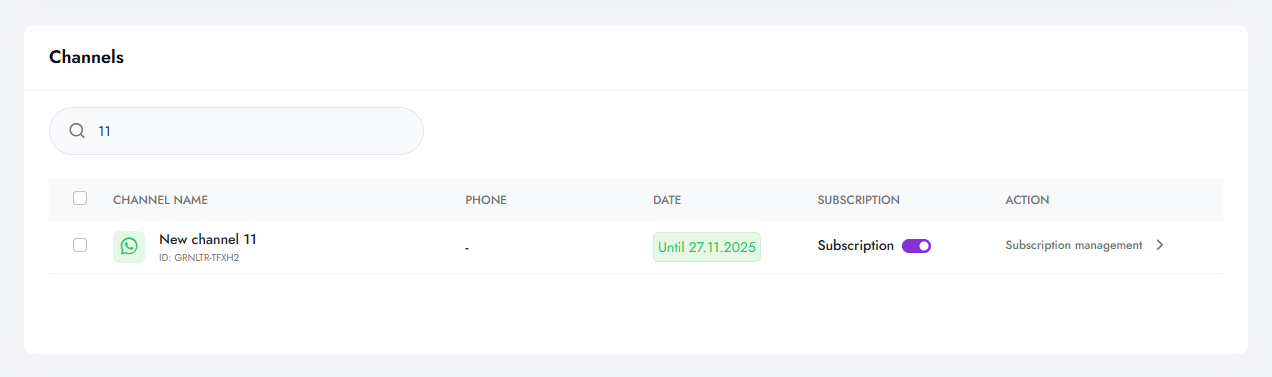
[The Billing section](https://panel.whapi.cloud/billing) in the Whapi Cloud panel is the center for managing all your payments.
In this section, you can see all your channels, the expiration date of the paid period, and the actions available for each of them.\
Next to each channel, you will see the **Subscription management** button, through which you can manage your subscription:
* view payment details,
* change the card,
* check for debts (If your Subscription payment **fails**, first resolve the issue with your card, then use this feature to retry the payment manually.)
* cancel the subscription.
### **Canceling a Subscription and Changing your card**
You can cancel your subscription(Unlink a bank card) at any time. Your channel will remain active until the end of the current billing period. There is no subscription on a trial or Sandbox channel, so there is nothing to unsubscribe from before the trial ends.
To do this, go to **Subscription Management** → **Unsubscribe**.
If you need to update your payment card, use the **Change Linked Card** option. The new details will take effect for your next scheduled payment.
### **Payment History**
For your convenience, your complete payment history is available in the **Billing →** [History section](https://panel.whapi.cloud/billing/history).
### Payment Processed But Channel Not Renewed
If you made a payment but the channel remains inactive or was not extended — please contact support.
**Reach us:**
* via chat on [dashboard](https://panel.whapi.cloud/dashboard)
* or by email:
**Please include:**
* Channel ID(s)
* Payment date
* Amount and payment method (card, crypto, etc.)
A specialist will verify the transaction and manually activate the channel if the payment is confirmed.